Time audit · iPhone · Mac · web

Audit your day.
For real.

48 half hours. What you did, not what you think you did. One tap every 30 minutes, no timer to start. By evening, you know where your hours went: white for what paid you back, hatched for what cost you.

One account. Your history follows you on iPhone, Mac and web.
full: it paid you backhatched: it cost you
TODAY, BY CATEGORY
Deep work7 hMeeting2 hSport1 hYouTube1.5 hScrolling1 h
THIS WEEK avg. 12.5
MTWTFSS
A real Thursday, counted to the half hour: 11 productive hours, 8.5 h of waste, score 66.
16:00to score
81▲ 6🔥12 d
16:00 → 16:30 what was it? the first ⌘1…4 score close
Deep work 🧠⌘1
Meeting 🤝⌘2
YouTube 📺⌘3
Scrolling 📱⌘4
Today
Reports
Categories
Settings
🔥
22days in a row
Reportsscore, streak, trends
22DAYS
ScoreWeekMonth
TODAY'S SCORE
81HALFF SCORE▲ 6 vs yesterday
Value ratio44/50 ▲ 2
Volume18/25 ▲ 1
Completion9/15 ▲ 3
Streak10/10
THE STREAK21 won out of 30 ▲ 3
🔥
22days in a row
TODAY, BY CATEGORY
Deep work7 hMeeting2 hSport1 hYouTube1.5 hScrolling1 h
DISCIPLINE
67of discipline · cycle in progress
TWO WEEKS
FOCUS BLOCKS
Halff under the notch, and the dashboard in a window. On the half hour it opens, you click, it closes.
The problem

It's 11 pm. What did you do today?

You work alone. Nobody looks over your shoulder, and it's easy to lie to yourself. You see your screen time, you know your effort isn't in the right place, but you have no real record of your day. Emails, meetings, scrolling, two or three real wins... it all blurs together. You can't fix what you can't see.

Halff is that audit. By evening, your day sits in front of you: every half hour either paid you back, or cost you.

A day without HalffThursday 5 September
Value
4.5h
Waste
10.5h
Score
30▼ 12
07:0011:0015:0019:0023:00
4.5 productive hours, 10.5 h gone up in smoke. Without seeing it.
The report

Did it pay you back,
or cost you?

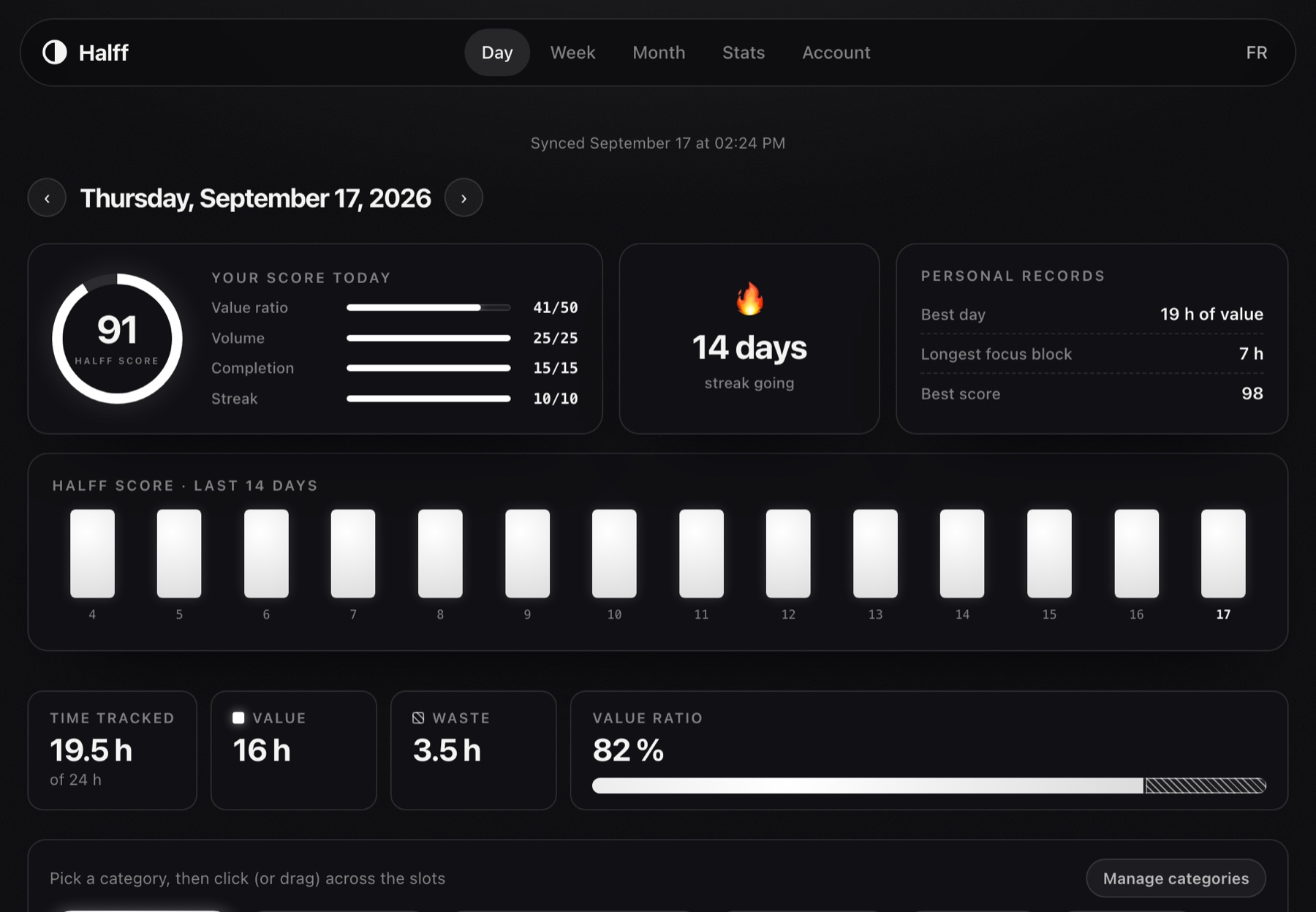
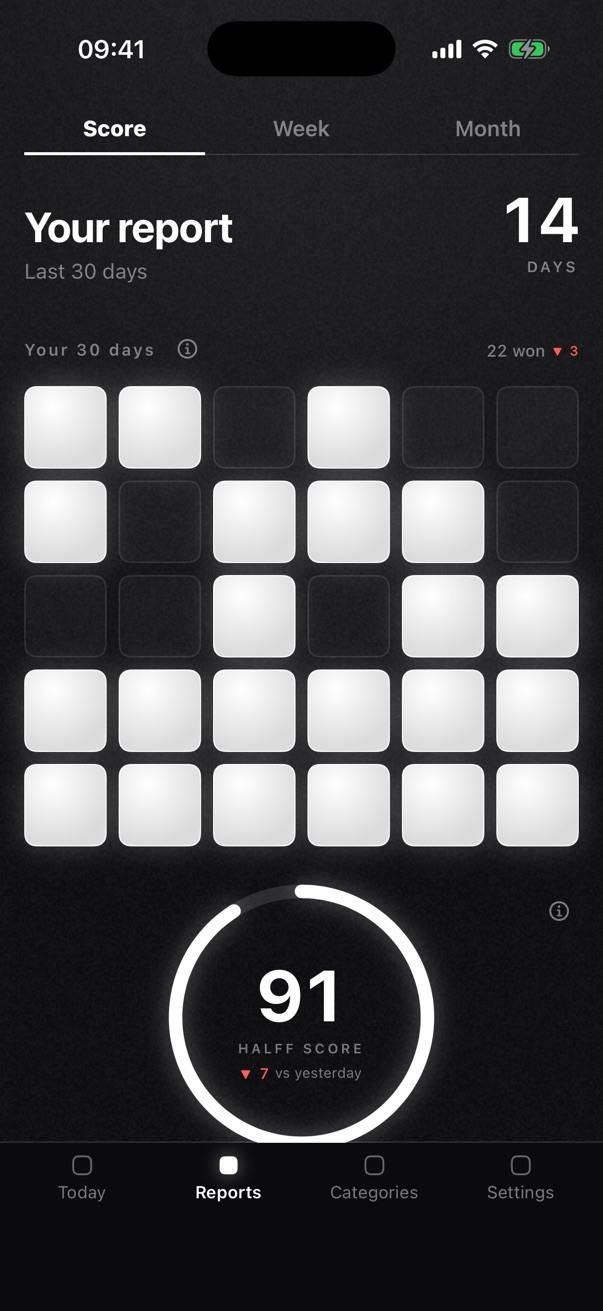
Halff doesn't just measure, it judges. Every half hour has a side. By evening, a score out of 100, your last 30 days as squares, the week as candles. And touches of green and red to tell you whether you did better than yesterday.

TODAY'S SCORE
81HALFF SCORE▲ 6 vs yesterday
Value ratio44/50 ▲ 2
Volume18/25 ▲ 1
Completion9/15 ▲ 3
Streak10/10
THE STREAK21 won out of 30 ▲ 3
🔥
22days in a row
THIS WEEKavg. 12.5
12,5
12
M
14
T
13.5
W
12.5
T
15
F
11
S
10
S
How it works

No timer
to start.

Toggl, Clockify, RescueTime: you ran them for three days, then forgot. Halff asks you to start nothing. Here is all it asks:

1

A nudge, a tap

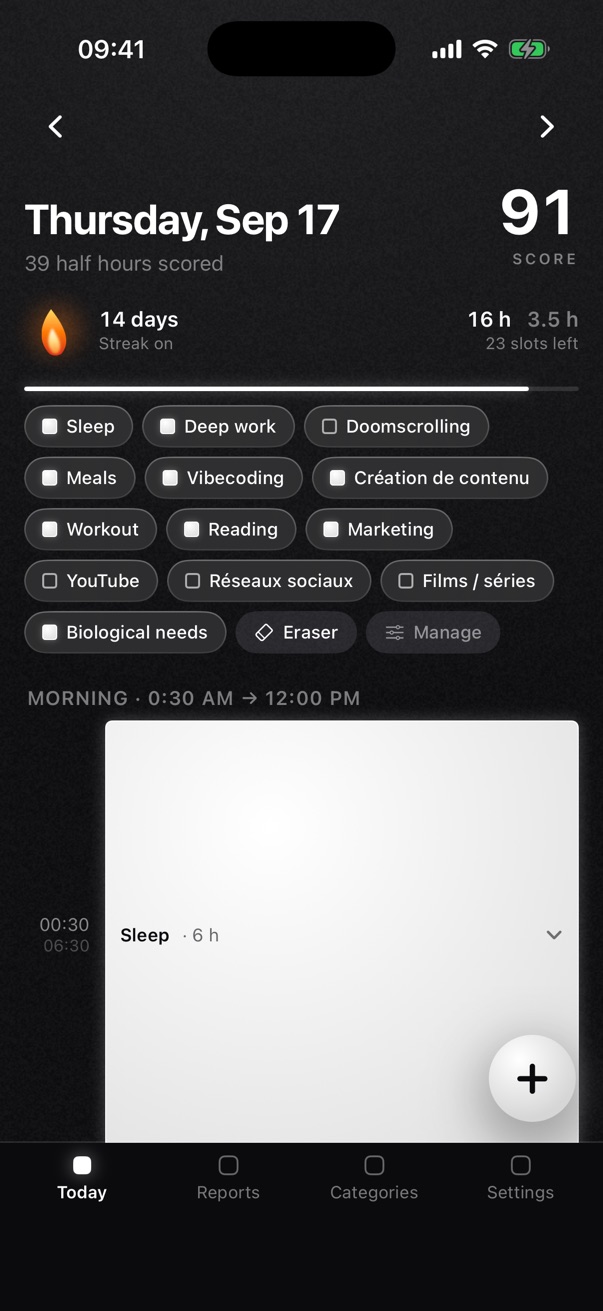
Every 30 minutes, Halff asks what you just did. One tap on a category, scored. Nothing to start, nothing to stop. No timer, no forgetting, no mental load. Only between your two hours, the ones you choose. Never at night.

2

It judges, it doesn't just measure

A tracker says how much. Halff says whether it was worth it: deep work, sport, reading pay you back. Scrolling, aimless YouTube cost you. You decide, and you can change your mind.

3

By evening, you know

A score out of 100, every day. It rises when your half hours pay you back, it drops when they cost you. You'll finally be able to answer: where did my day go?

The streak

You keep going,
because you see.

No levels, no badges. You score your day, your streak goes on. Skip a day, it starts over, and you see it. It's simple, and that's exactly why it holds. The streak counts the days in a row you kept it up.

🔥
22
days in a row
The concept

Your day is 48 half hours.
No more, no less.

Once sleep is taken out, you have about thirty left to play. Each one is a choice. Lose six a day, and that's 3 hours. 21 hours a week. Over 1,000 hours a year. Halff makes them visible. And what you see, you can change. 48 boxes doesn't mean 48 chores: Halff keeps count, you just tap.

A real day: 14 half hours that paid back, 14 that cost, 20 untracked. Makes you think, doesn't it?
Wherever you are

On iPhone, under the Mac's notch,
and on the web.

One account, one history. You score where you are, you read the report where you like.

16:00to score
81▲ 6🔥12 d
16:00 → 16:30 what was it? the first ⌘1…4 score close
Deep work 🧠⌘1
Meeting 🤝⌘2
YouTube 📺⌘3
Scrolling 📱⌘4
Today
Reports
Categories
Settings
🔥
22days in a row
Reportsscore, streak, trends
22DAYS
ScoreWeekMonth
TODAY'S SCORE
81HALFF SCORE▲ 6 vs yesterday
Value ratio44/50 ▲ 2
Volume18/25 ▲ 1
Completion9/15 ▲ 3
Streak10/10
THE STREAK21 won out of 30 ▲ 3
🔥
22days in a row
TODAY, BY CATEGORY
Deep work7 hMeeting2 hSport1 hYouTube1.5 hScrolling1 h
DISCIPLINE
67of discipline · cycle in progress
TWO WEEKS
FOCUS BLOCKS
Halff under the notch, and the dashboard in a window. On the half hour it opens, you click, it closes.
📱

iPhone

The nudge comes as a notification. You score with a tap, or drag your finger across several half hours to paint them at once. Eighteen widgets, three of them on the lock screen.

  • Score, streak and 48 boxes as widgets
  • Sleep read from Apple Health
  • Your iPhone purchase unlocks Mac and web
Download on the App Store →
💻

Mac: under the notch

Halff lives attached to the notch, in pure black. At rest it shows the time, your score and your streak. On the half hour it opens with four categories. One click or one shortcut, it closes.

  • Create your account, pick your plan, the download is waiting
  • ⌘⇧H to score at any time
  • On a Mac without a notch, a pill in the menu bar
Create my account, then download →
🌐

Web

Your dashboard in the browser, on any computer. To read, fill a gap, and see the month at a glance.

  • Day, week, month, categories
  • Full history
  • Windows and Linux go this way
Open my dashboard →
Pricing

One account. Three devices.
One price.

You create your account, you pick your plan, and everything opens: the Mac app downloads, the web unlocks, and the iPhone signs in with the same account.

01

Create your account

Google or email, 10 seconds. It's what follows your Halff across all your devices.

02

Pick your plan

Secure payment through Stripe. Cancel in one click, no questions asked.

03

Download and sign in

The Mac app, the web, the iPhone: you sign in once, your access comes with it.

Most chosen
Yearly
€59a year
that's €4.92 a month
  • 7 days free on iPhone, then €59 a year
  • iPhone, Mac and web
  • The discipline report on day 30
  • Cancel in one click
Get started
Monthly
€9.99a month
no commitment
  • 7 days free on iPhone, then €9.99 a month
  • iPhone, Mac and web
  • The discipline report on day 30
  • Cancel in one click
  • To try it for a month
Choose
Lifetime
€149once
never pay again
  • iPhone, Mac and web
  • Every update
  • Only here, on halff.io
Choose
Already bought on iPhone? Sign in here with the same account: your purchase attaches, Mac and web open up.
They use it

By evening, they know.
And it changes everything.

I got back 2 hours of value a day. Not by working more: by finally seeing where they went.
Thomas · after 3 weeks of Halff
T★★★★★

"I thought I worked 10 hours a day. Halff showed me 5 hours of real value. It stings, but two weeks later I'm at 7 hours of deep work."

Thomas · agency founder
C★★★★★

"The 30-minute nudge, I thought it would drive me mad. It's the opposite: one tap, 2 seconds, it's gone. The only tracker I've kept for more than a week."

Cléa · consultant
W★★★★★

"My first report: 3 hours of scrolling in a day. Seeing it hatched, to the half hour, is something else. I got my evenings back."

Wali · freelance developer
H★★★★★

"I open the report every evening like my sports stats. Days at 80 have become a game. My wife started too."

Hugues · small business owner
L★★★★★

"Zero setup, zero timer to start. It asks, I tap, done. 48 half hours scored without thinking about it."

Loïs · media buyer
A★★★★★

"I got it for work, I keep it for life. Seeing 'family' fill my weekends in white is worth every cent."

Adrien · sales rep
Questions

What you're probably wondering.

How much does Halff cost?

€9.99 a month with no commitment, or €59 a year, that's €4.92 a month. On iPhone, 7 days free before the first charge. Lifetime access, €149 once, exists only on halff.io. One account for iPhone, Mac and web.

Where does my data go?

Your half hours live on your device. With your account, they sync encrypted between iPhone, Mac and web, visible to you alone. Never sold, never ads. On the site, traffic is measured without cookies, anonymously.

I bought on iPhone, do I get the Mac?

Yes. Open the iPhone app signed in to your account: your purchase attaches by itself. Then sign in on Mac or on the web with the same account, everything opens.

What if I miss a nudge?

No big deal. On iPhone, you drag your finger across the missed half hours and they paint at once. On Mac and web, a mouse drag.

Windows? Linux?

The web dashboard works everywhere. The native app exists on iPhone (App Store) and on Mac. Your account follows, your data too.

Why 30 minutes, and not 1 hour?

In an hour, attention drifts, you multitask without noticing, and you rationalise: "I worked the whole hour", when really 25 minutes were productive. 30 minutes is the compromise: short enough to correct fast, long enough to produce, simple enough to repeat all day.

Is it proven?

Yes. Simply knowing you'll record what you do increases attention, discipline and the consistency between intentions and actions. It's the self-monitoring effect, documented in behavioural psychology (Herren, 1989: productivity gains held 10 months later). What gets measured gets fixed.

Why no colours?

Because your day doesn't need a rainbow to be readable. A full box paid you back. A hatched box cost you. Green and red show up for one thing only: better or worse than yesterday.

How many of your 48 half hours
really pay you back?

Today, your half hours evaporate without a trace. In a week, you'll know exactly which ones pay you back and which ones cost you. Install Halff. Live normally. Look at the report. Good luck.